Draw floor plans in your browserเขียนแบบแปลนได้เลยในเบราว์เซอร์

GridDraft 2D CAD is a free drafting tool that works the way AutoCAD does — type a command, snap to a point, dimension it. Nothing to install, and your drawings stay on your own machine.GridDraft 2D CAD คือโปรแกรมเขียนแบบ 2 มิติที่ใช้ฟรี ทำงานแบบเดียวกับ AutoCAD คือพิมพ์คำสั่ง จับจุด แล้วบอกระยะ ไม่ต้องติดตั้ง และแบบของคุณอยู่ในเครื่องของคุณเอง

No account needed · Works offline · Sign in only if you want Google Driveไม่ต้องสมัครสมาชิก · ใช้งานออฟไลน์ได้ · เข้าสู่ระบบเฉพาะเมื่อต้องการใช้ Google Drive

GridDraft 2D CAD workspace

What you can doทำอะไรได้บ้าง

Everything you need for a working floor plan — and nothing you have to pay for.มีครบสำหรับงานแบบแปลนหนึ่งชุด และไม่มีส่วนใดต้องเสียเงิน

Walls, doors and windows

Walls, doors and windowsเขียนผนัง ประตู หน้าต่าง

Draw walls with a real thickness, then drop in doors and windows that cut the opening for you. Wall junctions clean themselves up automatically.วาดผนังที่มีความหนาจริง แล้ววางประตูและหน้าต่างซึ่งเจาะช่องเปิดให้เอง จุดที่ผนังชนกันโปรแกรมลบเส้นซ้อนให้อัตโนมัติ

Dimensions and area take-off

Dimensions and area take-offบอกระยะและถอดพื้นที่

Linear, aligned and continued dimensions in millimetres, centimetres, metres, inches or feet. Click inside a room to get its area instantly.เส้นบอกระยะแนวนอน แนวเอียง และต่อเนื่อง เลือกหน่วยได้ทั้ง มม. ซม. ม. นิ้ว ฟุต คลิกในห้องเพื่อวัดพื้นที่ได้ทันที

Opens DWG and DXF

Opens DWG and DXFเปิดไฟล์ DWG และ DXF

Open drawings from AutoCAD R14 through 2018 and later, including old Thai-language files. Blocks, hatches and dimensions come through as editable geometry.เปิดไฟล์จาก AutoCAD ตั้งแต่ R14 ถึง 2018 ขึ้นไป รวมถึงไฟล์ภาษาไทยรุ่นเก่า บล็อก ลายแรเงา และเส้นบอกระยะแปลงเป็นเส้นที่แก้ไขได้

Print to scale

Print to scaleพิมพ์ตามมาตราส่วน

Export PDF, PNG or SVG on A4 to A0 at a real scale such as 1:100, with true lineweights. Choose the whole drawing, the current selection, or a window you pick.ส่งออก PDF, PNG หรือ SVG บนกระดาษ A4 ถึง A0 ตามมาตราส่วนจริง เช่น 1:100 ความหนาเส้นตรงตามที่ตั้งไว้ เลือกได้ว่าจะพิมพ์ทั้งแบบ เฉพาะที่เลือก หรือเฉพาะกรอบที่คลุม

Trace over a scan

Trace over a scanลอกแบบจากภาพสแกน

Drop in a photo or scan of an old drawing, calibrate it against one known dimension, fade it back and trace straight over the top.วางภาพถ่ายหรือภาพสแกนของแบบเก่า ปรับสเกลด้วยระยะที่รู้ค่าเพียงระยะเดียว แล้วปรับความจางเพื่อเขียนทับได้เลย

Your files, your Drive

Your files, your Driveไฟล์อยู่กับคุณ

Work offline with nothing installed. Sign in with Google to keep drawings in your own Drive — the app only ever sees the files you open here.ใช้งานออฟไลน์ได้โดยไม่ต้องติดตั้ง เข้าสู่ระบบด้วย Google เพื่อเก็บแบบไว้ในไดรฟ์ของคุณเอง แอปเห็นเฉพาะไฟล์ที่เปิดผ่านโปรแกรมนี้เท่านั้น

How it worksเริ่มใช้งานอย่างไร

  1. Open the app — it loads straight into an empty drawing, no sign-up screen in the way.เปิดโปรแกรม เข้าสู่หน้ากระดาษเปล่าได้ทันที ไม่ต้องสมัครสมาชิกก่อน
  2. Type W for a wall, click a start point, then type a distance such as 6000 and press Tab for the angle.พิมพ์ W เพื่อวาดผนัง คลิกจุดเริ่ม แล้วพิมพ์ระยะ เช่น 6000 กด Tab เพื่อใส่มุม
  3. Add doors (DR), windows (WN), text (T) and dimensions (DLI).ใส่ประตู (DR) หน้าต่าง (WN) ข้อความ (T) และเส้นบอกระยะ (DLI)
  4. Save as PDF at 1:100, as DXF for AutoCAD, or keep the editable GridDraft file.บันทึกเป็น PDF มาตราส่วน 1:100, เป็น DXF สำหรับ AutoCAD หรือเก็บเป็นไฟล์ GridDraft ที่แก้ต่อได้

About usเกี่ยวกับเรา

GridDraft started as an in-house tool. Small drawings — a room layout, a revised door schedule, a site sketch for a meeting tomorrow — do not justify a full CAD licence, yet they still have to be drawn properly and printed to scale.GridDraft เริ่มจากเครื่องมือที่ทำใช้เองในหน่วยงาน งานแบบเล็ก ๆ เช่น ผังห้อง แก้ตำแหน่งประตู หรือสเก็ตช์ผังบริเวณเพื่อใช้ประชุมพรุ่งนี้ ไม่คุ้มที่จะซื้อลิขสิทธิ์ CAD เต็มรูปแบบ แต่ก็ยังต้องเขียนให้ถูกต้องและพิมพ์ตามมาตราส่วนได้

So it is built around three rules: it must open the DWG and DXF files people already have, it must print to a real scale, and it must never hold your drawings hostage. Files are yours, stored on your machine or in your own Google Drive.จึงยึดหลัก 3 ข้อ คือ ต้องเปิดไฟล์ DWG และ DXF ที่มีอยู่แล้วได้ ต้องพิมพ์ตามมาตราส่วนจริงได้ และต้องไม่จับไฟล์ของผู้ใช้เป็นตัวประกัน ไฟล์เป็นของคุณ เก็บไว้ในเครื่องของคุณหรือใน Google Drive ของคุณเอง

  • Free to use, no feature locked behind a planใช้ฟรี ไม่มีฟีเจอร์ไหนถูกล็อกไว้ขาย
  • Runs entirely in your browser — we store no drawings on any serverทำงานในเบราว์เซอร์ทั้งหมด เราไม่เก็บแบบของคุณไว้บนเซิร์ฟเวอร์ใด ๆ
  • Thai and English interfaceใช้ได้ทั้งภาษาไทยและภาษาอังกฤษ

GridDraft is a drafting aid, not an engineering certification. Drawings used for construction or permit submission must be checked and sealed by a licensed professional.GridDraft เป็นเครื่องมือช่วยเขียนแบบ ไม่ใช่การรับรองทางวิศวกรรม แบบที่ใช้ก่อสร้างหรือยื่นขออนุญาตต้องผ่านการตรวจและลงนามโดยผู้มีใบอนุญาต
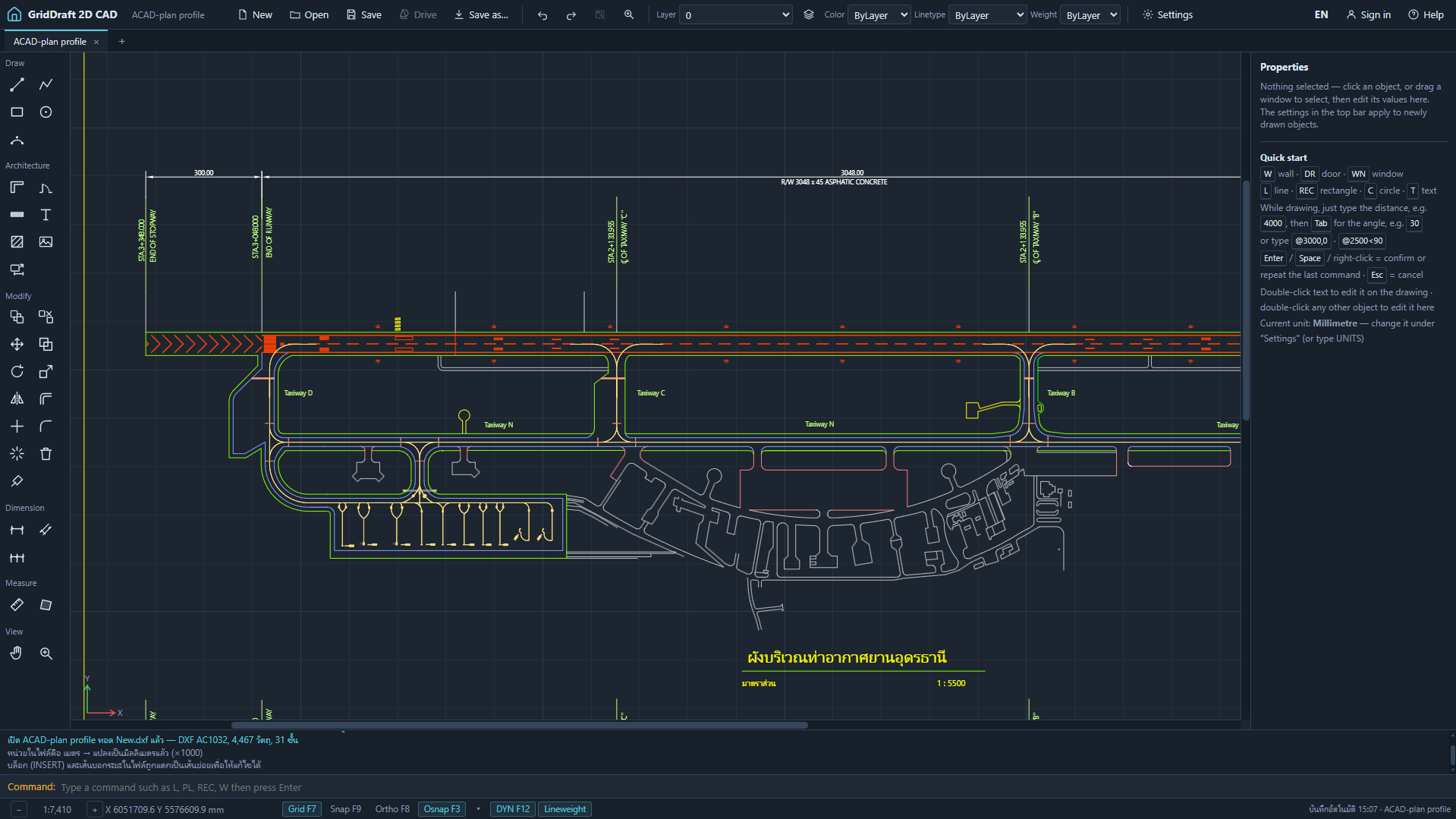
A drawing made with GridDraft

Common questionsคำถามที่พบบ่อย

Is it really free?ใช้ฟรีจริงหรือ

Yes. The site is supported by a small advert panel and voluntary tips. Every drawing feature is available to everyone.ใช้ฟรีจริง เว็บมีรายได้จากกรอบโฆษณาเล็ก ๆ และการสนับสนุนตามสมัครใจ ทุกฟีเจอร์เปิดให้ทุกคนใช้เท่ากัน

Do I have to sign in?ต้องเข้าสู่ระบบไหม

No. Sign in only if you want to open and save files in your Google Drive. The app requests the narrowest Drive permission available and can only see files you open or create with it.ไม่ต้อง เข้าสู่ระบบเฉพาะเมื่อต้องการเปิดและบันทึกไฟล์บน Google Drive แอปขอสิทธิ์แบบแคบที่สุด และเห็นเฉพาะไฟล์ที่เปิดหรือสร้างผ่านโปรแกรมนี้

Can it replace AutoCAD?ใช้แทน AutoCAD ได้เลยไหม

Not for large projects, 3D work or xrefs. For 2D floor plans, edits to a drawing someone sent you, and printing to scale, it does the job.ไม่ได้สำหรับงานโครงการใหญ่ งาน 3 มิติ หรืองานที่ใช้ xref แต่สำหรับแบบแปลน 2 มิติ การแก้ไฟล์ที่คนอื่นส่งมา และการพิมพ์ตามมาตราส่วน ใช้ได้สบาย

Where are my files kept?ไฟล์เก็บอยู่ที่ไหน

In your browser and wherever you save them — your disk or your own Google Drive. Nothing passes through our servers.อยู่ในเบราว์เซอร์ของคุณ และที่ที่คุณกดบันทึก คือดิสก์ของคุณหรือ Google Drive ของคุณเอง ไม่มีข้อมูลผ่านเซิร์ฟเวอร์ของเรา

Open a drawing and seeลองเปิดใช้งานดู

It opens in a couple of seconds and works offline afterwards.เปิดได้ในไม่กี่วินาที และใช้งานออฟไลน์ได้หลังจากนั้น

Start drawing — freeเริ่มเขียนแบบ ฟรี